Install Freebsd en Alder Lake placa asus prime 6660, radeon 6660 y RTL8125 sin morir en el intento
Y como es costumbre en este blog, vamos a escribir esto sobre la marcha.
Como instalar freebsd y no morir en el intento..
De momento estamos muriendo y no hemos empezado, freebsd va perfecto en mis servidores y maquinas virtuales y cuando todo esta testeado, pero el equipo es del 2022 y parece que ya tenemos problemas con la red.
En el instalador ya nos dio problemas, no detecta la red, tarjeta detectada RTL8125 2.5GvE Controller
Ahí morimos, así que toca meter el driver a mano a ver si hay suerte, podemos, hacer varias cosas
Instalar el sistema sin red y luego meter el driver, es casi lo mismo, pero el instalador prefiero que descargue los drivers de todo lo demás y lo deje fino, aunque sin escritorio, que para el caso da lo mismo.
He buscado los drivers por internet y no hay manera de encontrar el bendito enlace del .pkg, mi falta de experiencia con los paquetes de freebsd es lo que tiene
Así que he descargado el paquete desde un freebsd que tengo en producción:
pkg fetch realtek-re-kmodCopiamos el archivo descargado a /root luego lo descargamos y metemos en el pendrive junto con la ISO
cp /var/cache/pkg/realtek-re-kmod-1101.00.1305000.pkg /rootY ahora vuelta a empezar con el instalador a ver que sale de todo esto
¿para que freebsd en mi equipo?
Esto tenia que haberlo dicho al inicio, pero como todo aquí, va sobre la marcha...
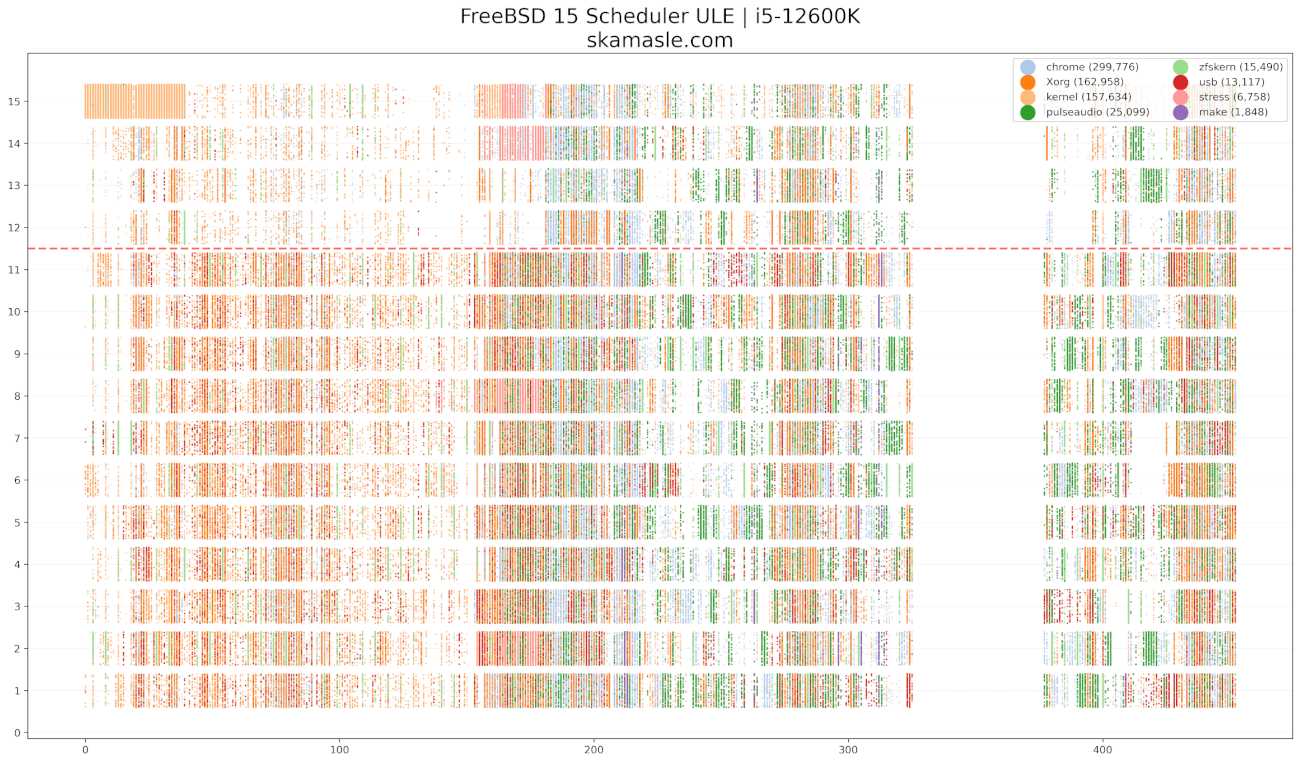
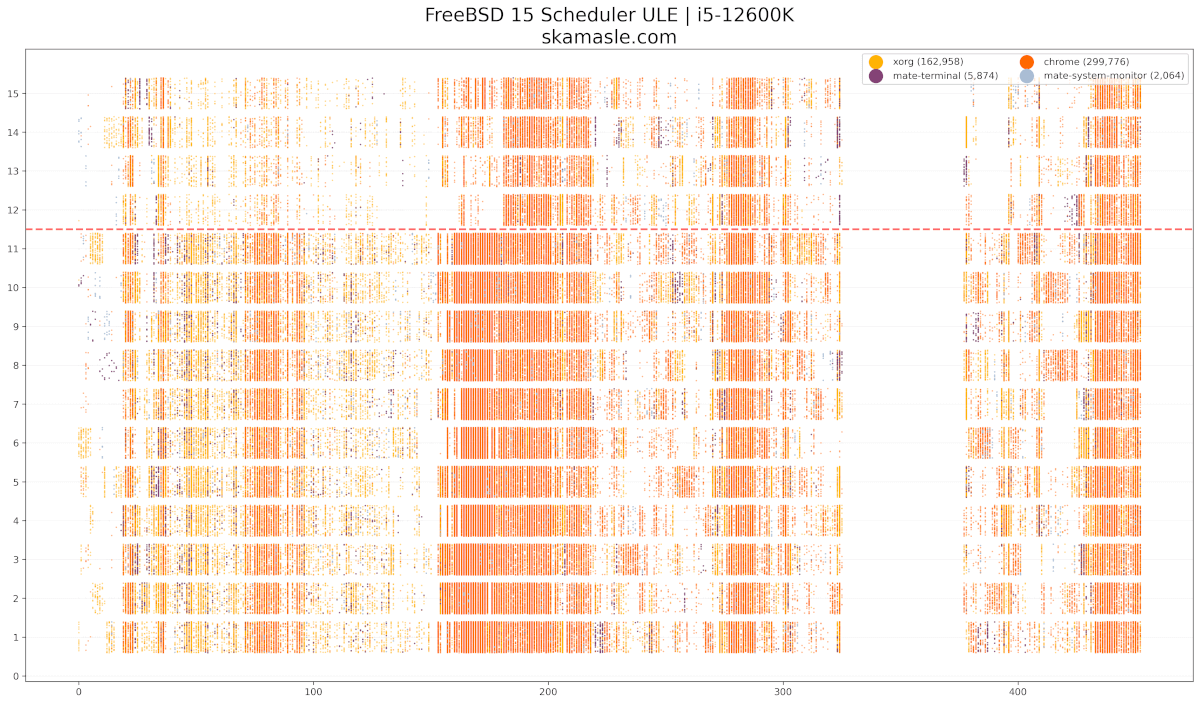
Quiero probar los e-cores y p-cores en freebsd y comparar como se comporta, lo mismo que hicimos la otra vez en linux -> https://skamasle.com/e-cores-y-p-cores-de-forma-grafica-ander-lake-i5-12600k.html
Por eso he descargado la versión 15 de freebsd, quiero generar las trazas desde el kernel y ver si el scheduler de freebsd lo hace bien, poca información hay en internet sobre esto, así que a ver que sale, pero primero tenemos que instalar freebsd en un equipo no muy antiguo y la ultima versión de freebsd nos esta dando ya problemillas menores que hay que ir solventando.
Seguimos....
---------- Media hora después.
Un desastre, he intentado cargar el modulo desde el pendrive en el que tengo la ISO y no hay manera desde el instalador, así que instale el sistema base y arranque freebsd 15.......... no he podido montar el pendrive, no hay forma de que freebsd detecte el sistema de archivos que metió ventoy, no carga los drivers de msdosfs tampoco.. en fin al fallar el driver de la tarjeta de red no se instala nada...
Volvemos a debian para escribir esta frustración y preparar un pendrive con Fat32 y cargar el driver desde ahí, esperemos tener mejor suerte con esa estrategia.
1 hora después, nada de nada, imposible con el pendrive, viene tan base el sistema que no me lo detecta por algún motivo y el modulo no existe tampoco, no hay evidencias de nada tampoco, al final no se puede copiar y pegar bien la info sin entorno gráfico...
En todo caso da igual, he montado el zroot en debian y he copiado el fichero y lo había bajado para la versión 13 desde el propio freebsd, así que no me sirvió de nada y llevo media hora buscando donde descargar el PKG para la 15 y no he encontrado nada.......
Investigando he descargado el packagesite.pkg
wget http://pkg.freebsd.org/FreeBSD:15:amd64/latest/packagesite.pkgLo he descomprimido con tar y dentro del packagesite.yaml esta la info de donde están los archivos
{"name":"realtek-re-kmod198","origin":"net/realtek-re-kmod198","version":"198.00.1500068","comment":"Kernel driver for Realtek PCIe Ethernet Controllers","maintainer":"george@m5p.com","www":"https://github.com/alexdupre/rtl_bsd_drv","abi":"FreeBSD:15:amd64","arch":"freebsd:15:x86:64","prefix":"/usr/local","sum":"1f2c81bf5b133fa62ceebe7c731ff1607320254f12032f8ff912d012bead5c24","flatsize":1068248,"path":"All/Hashed/realtek-re-kmod198-198.00.1500068~1f2c81bf5b.pkg","repopath":"All/Hashed/realtek-re-kmod198-198.00.1500068~1f2c81bf5b.pkg","licenselogic":"single","licenses":["BSD4CLAUSE"],"pkgsize":104691,"desc":"Realtek PCIe FE / GBE / 2.5G / Gaming Ethernet Family Controller\nkernel driver.\n\nThis is the official driver from Realtek with a few patches to\nimprove stability and performance. It can be loaded instead of\nthe FreeBSD driver built into the GENERIC kernel if you experience\nissues with it (eg. watchdog timeouts), or your card is not supported.\n\nSupported devices:\n\n* 2.5G Gigabit Ethernet\n  - RTL8125 / RTL8125B(S)(G)\n\n* 10/100/1000M Gigabit Ethernet\n  - RTL8111B / RTL8111C / RTL8111D / RTL8111E / RTL8111F / RTL8111G(S)\n    RTL8111H(S) / RTL8118(A)(S) / RTL8119i / RTL8111L / RTL8111K\n  - RTL8168B / RTL8168E / RTL8168H\n  - RTL8111DP / RTL8111EP / RTL8111FP\n  - RTL8411 / RTL8411B\n\n* 10/100M Fast Ethernet\n  - RTL8101E / RTL8102E / RTL8103E / RTL8105E / RTL8106E / RTL8107E\n  - RTL8401 / RTL8402\n\nSee also: https://www.realtek.com/en/component/zoo/category/network-interface-controllers-10-100-1000m-gigabit-ethernet-pci-express-software","categories":["kld","net"],"annotations":{"FreeBSD_version":"1500068","build_timestamp":"2026-02-13T09:34:35+0000","built_by":"poudriere-git-3.4.4-15-g61aba751","port_checkout_unclean":"no","port_git_hash":"b64b73fd938d5b2788547d16ed6a76493acc9142","ports_top_checkout_unclean":"no","ports_top_git_hash":"98350da90e9369a1b0c6ed070ba8ae746cabe387"},"messages":[{"message":"Add the following lines to your /boot/loader.conf\nto override the built-in FreeBSD re(4) driver.\n\nif_re_load=\"YES\"\nif_re_name=\"/boot/modules/if_re.ko\"\n\nBy default, the size of allocated mbufs is enough\nto receive the largest Ethernet frame supported\nby the card.  If your memory is highly fragmented,\ntrying to allocate contiguous pages (more than\n4096 bytes) may result in driver hangs.\nFor this reason the value is tunable at boot time,\ne.g. if you don't need Jumbo frames you can lower\nthe memory requirements and avoid this issue with:\n\nhw.re.max_rx_mbuf_sz=\"2048\"","type":"install"}]}
{"name":"realtek-re-kmod","origin":"net/realtek-re-kmod","version":"1101.00.1500068","comment":"Kernel driver for Realtek PCIe Ethernet Controllers","maintainer":"ale@FreeBSD.org","www":"https://github.com/alexdupre/rtl_bsd_drv","abi":"FreeBSD:15:amd64","arch":"freebsd:15:x86:64","prefix":"/usr/local","sum":"ee9ead4a1dceb8969a27887d89e0336c0ca1f33a452ccf19f93f88d238962bd4","flatsize":1417361,"path":"All/Hashed/realtek-re-kmod-1101.00.1500068~ee9ead4a1d.pkg","repopath":"All/Hashed/realtek-re-kmod-1101.00.1500068~ee9ead4a1d.pkg","licenselogic":"single","licenses":["BSD4CLAUSE"],"pkgsize":160623,"desc":"Realtek PCIe FE / GBE / 2.5G / 5G Ethernet Family Controller\nkernel driver.\n\nThis is the official driver from Realtek with a few patches to\nimprove stability and performance. It can be loaded instead of\nthe FreeBSD driver built into the GENERIC kernel if you experience\nissues with it (eg. watchdog timeouts), or your card is not supported.\n\nSupported devices:\n\n* 5G Gigabit Ethernet\n  - RTL8126\n\n* 2.5G Gigabit Ethernet\n  - RTL8125 / RTL8125B(G)\n\n* 10/100/1000M Gigabit Ethernet\n  - RTL8111B / RTL8111C / RTL8111D / RTL8111E / RTL8111F / RTL8111G\n    RTL8111H / RTL8118(A) / RTL8119i / RTL8111L / RTL8111K\n  - RTL8168B / RTL8168E / RTL8168H\n  - RTL8111DP / RTL8111EP(P) / RTL8111FP\n  - RTL8411 / RTL8411B\n\n* 10/100M Fast Ethernet\n  - RTL8101E / RTL8102E / RTL8103E / RTL8105E / RTL8106E / RTL8107E\n  - RTL8401 / RTL8402\n\nSee also: https://www.realtek.com/en/component/zoo/category/network-interface-controllers-10-100-1000m-gigabit-ethernet-pci-express-software","categories":["kld","net"],"annotations":{"FreeBSD_version":"1500068","build_timestamp":"2026-02-13T04:25:42+0000","built_by":"poudriere-git-3.4.4-15-g61aba751","port_checkout_unclean":"no","port_git_hash":"78fcec37bd2016f6ade0e323acf43fa576126e43","ports_top_checkout_unclean":"no","ports_top_git_hash":"98350da90e9369a1b0c6ed070ba8ae746cabe387"},"messages":[{"message":"Add the following lines to your /boot/loader.conf\nto override the built-in FreeBSD re(4) driver.\n\nif_re_load=\"YES\"\nif_re_name=\"/boot/modules/if_re.ko\"\n\nBy default, the size of allocated mbufs is enough\nto receive the largest Ethernet frame supported\nby the card.  If your memory is highly fragmented,\ntrying to allocate contiguous pages (more than\n4096 bytes) may result in driver hangs.\nFor this reason the value is tunable at boot time,\ne.g. if you don't need Jumbo frames you can lower\nthe memory requirements and avoid this issue with:\n\nhw.re.max_rx_mbuf_sz=\"2048\"\n\nTo enable Wake on LAN (WoL) support you might need\nto set the following tunables:\n\nhw.re.s5wol=\"1\"\nhw.re.s0_magic_packet=\"1\"\n\nIf you experience network hangs with IPv6 enabled,\nyou might need to disable the checksum offloading\nby adding the following parameters to the related\nifconfig line in your /etc/rc.conf file:\n\n-rxcsum -txcsum -rxcsum6 -txcsum6","type":"install"}]}
No repare en la carpeta Hashed...
El driver para la RTL8125 esta aquí:
http://pkg.freebsd.org/FreeBSD:15:amd64/latest/All/Hashed/realtek-re-kmod-1101.00.1500068~ee9ead4a1d.pkg
Vamos a meter el driver directamente al disco de freebsd desde debian, instalando las herramientas de zfs para gestionar el sistema, el paquete que necesitamos instalar es zfsutils-linux
zpool import -N -f zroot
zpool export zroot
zpool import -f -R /mnt zroot
IMPORTANTE: si usas zfs mount zroot/ROOT/default
Vas a tener un problema y es que se va a montar sobre /
Al fin el driver... costo más encontrarlo que instalarlo..
pkg add realtek-re-kmod-1101.00.1500068~ee9ead4a1d.pkgvi /boot/loader.confif_re_load="YES"
if_re_name="/boot/modules/if_re.ko"
kldload /boot/modules/if_re.ko
ifconfigifconfig re0 up dhclient re0# ifconfig
lo0: flags=1008049<UP,LOOPBACK,RUNNING,MULTICAST,LOWER_UP> metric 0 mtu 16384
options=680003<RXCSUM,TXCSUM,LINKSTATE,RXCSUM_IPV6,TXCSUM_IPV6>
inet 127.0.0.1 netmask 0xff000000
inet6 ::1 prefixlen 128
inet6 fe80::1%lo0 prefixlen 64 scopeid 0x1
groups: lo
nd6 options=21<PERFORMNUD,AUTO_LINKLOCAL>
re0: flags=1008843<UP,BROADCAST,RUNNING,SIMPLEX,MULTICAST,LOWER_UP> metric 0 mtu 1500
options=60251b<RXCSUM,TXCSUM,VLAN_MTU,VLAN_HWTAGGING,TSO4,LRO,WOL_MAGIC,RXCSUM_IPV6,TXCSUM_IPV6>
ether b2:fc:e6:15:89:53
inet 192.168.1.21 netmask 0xffffff00 broadcast 192.168.1.255
media: Ethernet autoselect (1000baseT <full-duplex,rxpause,txpause>)
status: active
nd6 options=29<PERFORMNUD,IFDISABLED,AUTO_LINKLOCAL>pkg install xorg mate mate-desktop slim drm-61-kmod gpu-firmware-kmod
/etc/rc.confsysrc dbus_enable="YES"
# Activar el gestor de login slim
sysrc slim_enable="YES"
# Cargar el driver de AMD
sysrc kld_list+="amdgpu"kldload amdgpu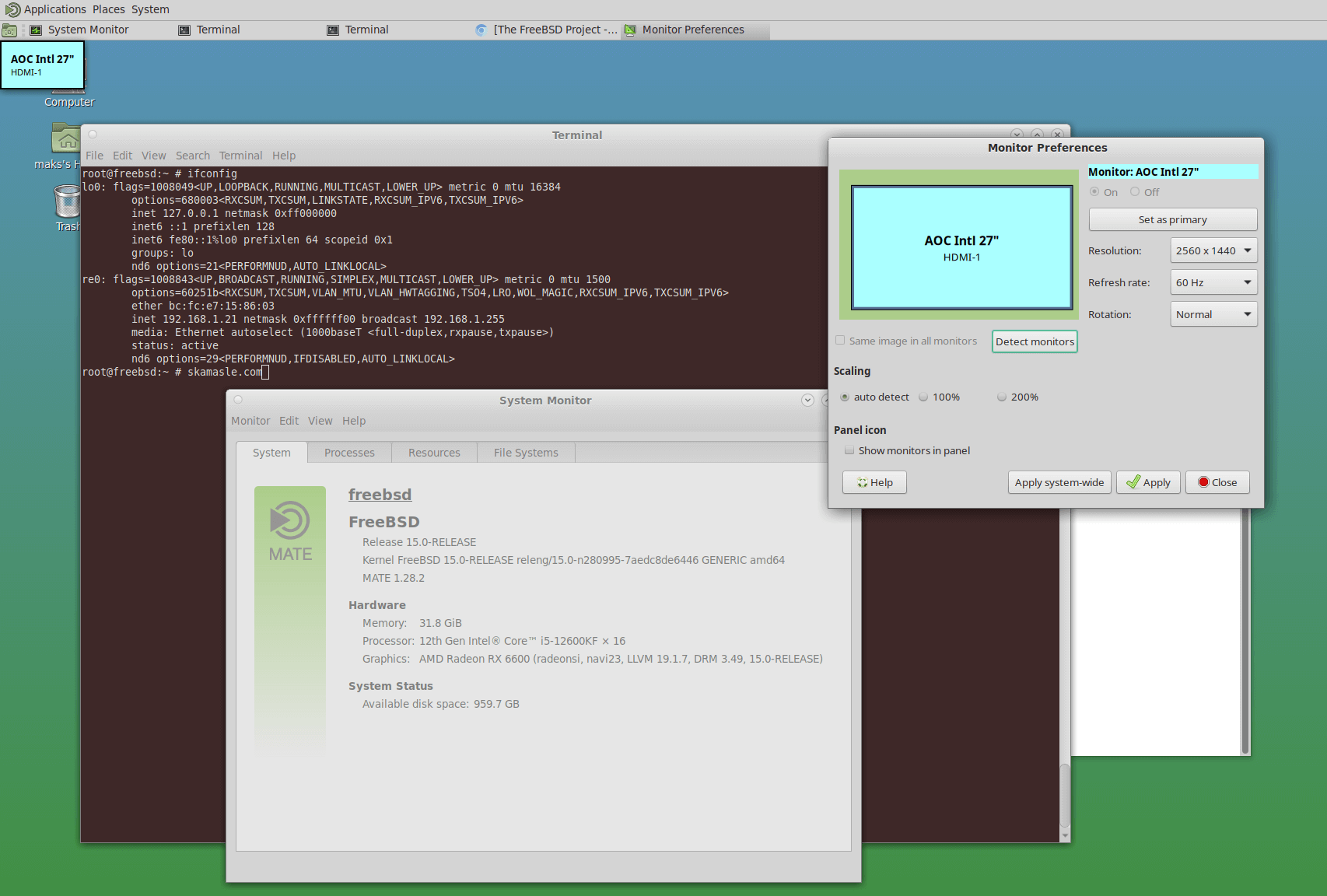
Freebsd vs linux e-cores y p-cores
You should also read:
CVE-2026-43499 (rtmutex) vs CVE-2026-46242 (epoll), ¿ que es epoll y rtmutex ? Explicación como si estuviera en primero.
MUTEX Y EPOLL ¿que son y que hacen? Las explicaciones en los CVE son complicadas, hablan de epoll, eventpoll, mutex, rtmutex etc pero veamos que significa cada cosa. Y antes de hablar de rt-mutex hay que saber que hace mutex. ¿Qué es un mutex? Un…
Continue reading...Sin espacio en boot, reduciendo initramfs sin morir en el intento.
Deje una partición boot más pequeña al instalar y siempre me da problemas, esta vez sabia que tenia que dejar 1 GB o más pero de ultima hora ya tenia las particiones y se me olvido el UEFI y bot quedo de 512 MB para…
Continue reading...Más allá del htop: E-Cores y P-cores de forma gráfica en Alder Lake i5-12600K, como cambian de core los procesos en linux.
Desde que instalé mi i5-12600, he estado obsesionado con entender cómo gestiona Linux su arquitectura híbrida. En herramientas como htop o btop, vemos porcentajes de uso que se actualizan cada pocos segundos.
Hoy vamos a bajar al nivel del kernel para ver cómo el scheduler de Linux (el orquestador de procesos) mueve los hilos entre núcleos de alto rendimiento (P-Cores) y de eficiencia (E-Cores).

Como vemos en la imagen ( HTOP )Core 6, 8 y 11 están usando el 100 % del CPUPero, ¿qué pasa realmente en la escala de microsegundos?
Continue reading...